1.1 Create Supplemental in RL to BV
There are four main sections for the rights integration to BV-
- Supplemental Information is entered
- Required fields to be populated
- Supplemental status is set to “Ready for Scheduling”
- Pledge breaks have PBS NOLA = 'PBRK'
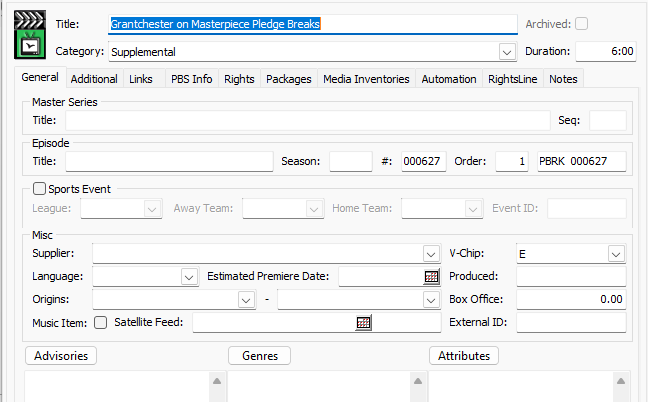
Supplemental records are pledge breaks which will be created in Broadview as episode category =Supplemental.
Step | Action | Result |
1. Go to the catalog and click on |
From the dropdown
|
|
2. Enter the below required fields on Supplemental Records:
| Type the values in the required fields on Rights-In Records:
Click ‘Save’ after adding the fields.
For Pledge Break, Make sure NOLA Root = 'PBRK'
| The following fields are displayed on the Supplemental Records -
For Pledge Break, PBS NOLA Root = PBRK is saved. |
| 3. Associate a compilation, a series, a season/re-cut season, an episode/re-cut episode, OTO, or distribution season to a Supplemental. | Click on Related Catalog and Add Association | Add association is selected. |
| 4. Associate Catalog to a Supplemental record. | Associate as a Parent Select which compilation, series, season/recut season or OTO or episode/recut episode, and SAVE   | The catalog is associated to a Supplemental record. |
5. Update the status on the Supplemental Record to “Ready for Scheduling” | Click on the Supplemental status to update from “In Progress” to “Ready for Scheduling”.
| Supplemental record status is set to Ready for Scheduling. |
6. Confirm the PBS Traffic ID is populated on Supplemental Records. | Click in BV and check the episode is with episode category as Supplemental.
Pledge Break example:
| Supplemental record is created in BV. |
 sign.
sign.